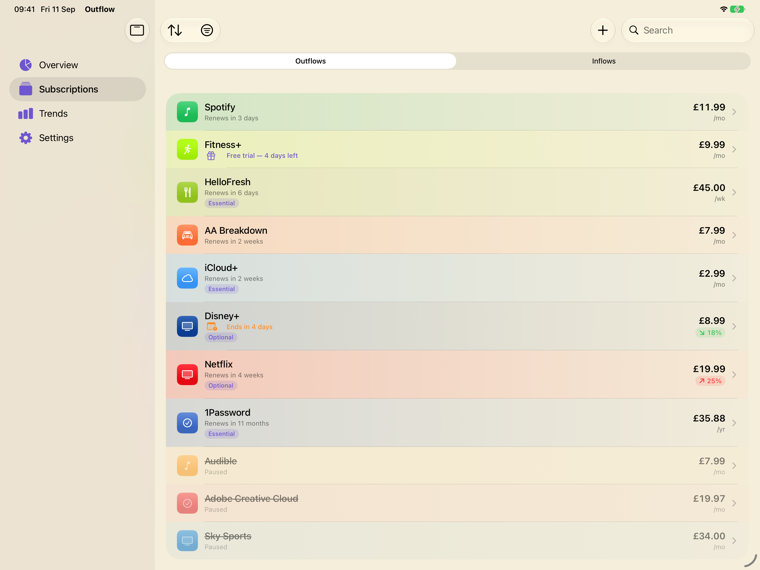
Know exactly what you pay for — and what comes in. Outflow tracks every subscription, bill and payday on iPhone, iPad and Mac — with what's due next on your Apple Watch — and finds the ones you've forgotten in transactions Apple already keeps on your iPhone. No bank login, no account, and nothing ever leaves your device.
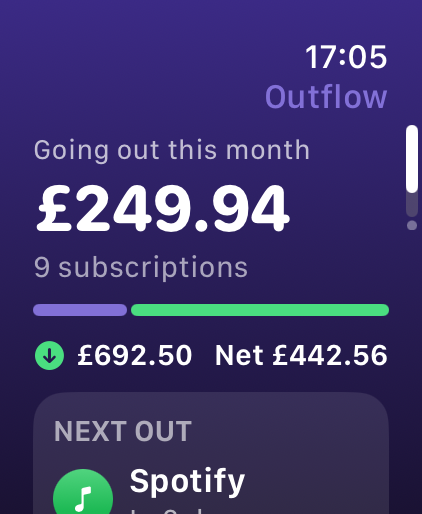
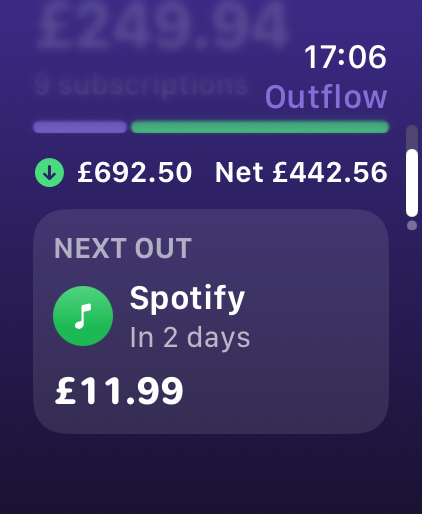
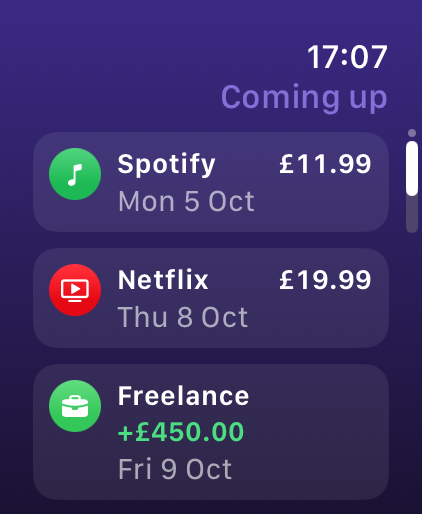
Raise your wrist and see this month's total, the next
payment and everything coming up — in and out. The Watch shows the same
figures as your iPhone, sent straight from it: there is no server in
between, and no account.
This month at a glanceWhat's nextEverything coming up
Part of Outflow Pro — a one-time purchase, never a
subscription. Needs the iPhone app and watchOS 11 or later.
Only in Outflow
Two things the others simply don't do.
Every subscription tracker shows you a list of what you
pay for. Outflow answers the two questions that list can't: what is this
costing us, and can I actually afford it?
👥
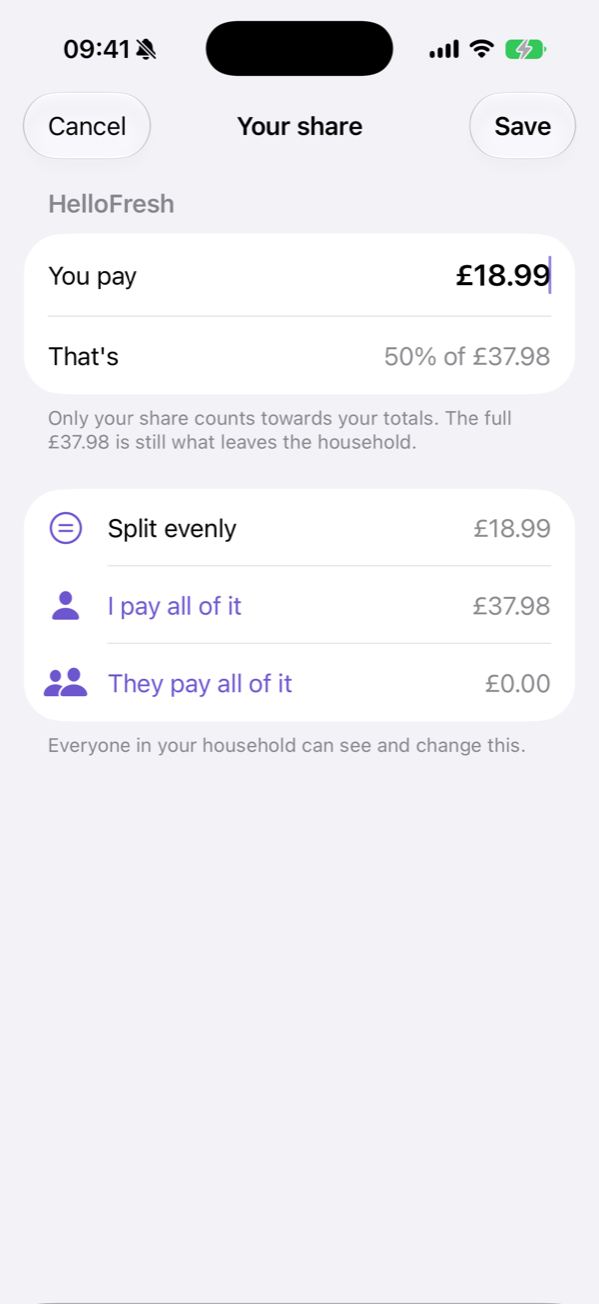
Shareflows
Your household, counted once.
Share chosen subscriptions with a partner over iCloud. Split each
one however it really works — evenly, all yours, all theirs — and a
joint bill counts towards your total by your share only, instead of
being recorded twice in two separate apps and inflating both.
Everything you don't share stays private to you. No account, no
server: it moves through your own iCloud.
£240 a month is comfortable on £4,000 of income and alarming on
£1,400. Outflow tracks what arrives as well as what leaves — salary,
freelance, benefits, a pension, rent — and keeps the two sides
separate, so income is never quietly counted as a cost.
No bank login needed. Recurring income is predictable by
definition, so you enter it once and it stays right.
The subscriptions that cost you most are the ones you
have forgotten. Outflow can now find them in the transactions Apple already
keeps on your iPhone — using Apple's FinanceKit, the
framework Apple built precisely so a finance app can be useful without
becoming a data broker.
It stays on your iPhone
The transactions are read from the on-device store. They do not
travel to us — we have no server — and Apple states the data is
never seen by Apple either.
You decide the scope
Apple's own permission sheet, not ours. You choose which accounts
Outflow may look at and how far back it may look, and you can withdraw
it at any time in iOS Settings.
No login, at any point
You are never asked for a bank username, password or one-time code.
There is no Plaid connection and no third-party data provider between
you and your own money.
“This information is retrieved directly from the on-device data store
and never seen by Apple.”
Which banks? In the UK, FinanceKit
uses open banking and needs iOS 18.4 or later; Apple lists Barclays,
Barclaycard, First Direct, Halifax, HSBC, Lloyds, M&S Bank, MBNA, Monzo,
Nationwide, NatWest, Royal Bank of Scotland and Santander. In the US it
covers Apple Card, Apple Cash and Savings. Beta, and off until you turn it
on: Settings › Beta › Find from transactions. Everywhere else, scanning a
statement does the same job on any device.
Money in and outScan a statement. Done.No bank login required.Split a bill in one tapSee your whole yearYour year, worth sharingAlways in view
What makes it different
Built to respect you, not monetise you.
Most subscription trackers charge monthly fees or demand your bank credentials. Outflow does neither. Track everything privately, and pay once — or not at all.
🔒
Private by architecture
Everything lives on your iPhone. No account to create, no server that could be breached, no analytics calling home. App Store Privacy label: Data Not Collected — the rarest badge in finance apps.
📄
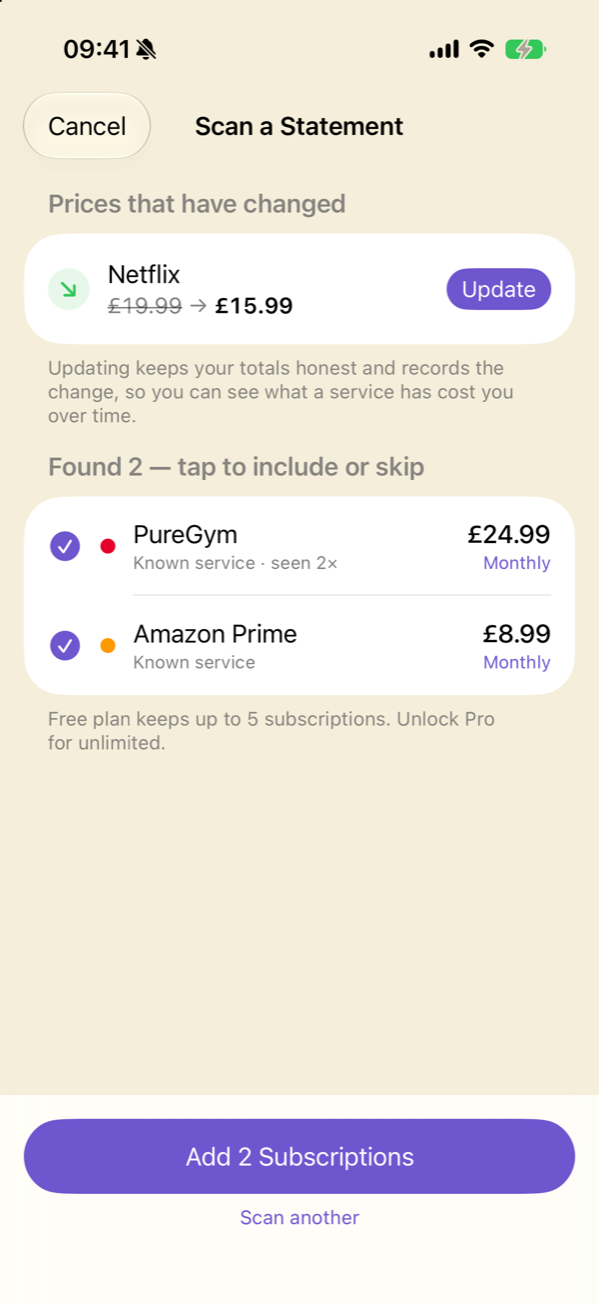
Scan a Statement
Paste or import a bank or card statement (PDF or screenshot) and on-device AI finds every recurring charge in it — then adds them all in one tap. Rocket Money's trick, without the bank login. Nothing is uploaded, anywhere.
✨
Smart Paste
Paste a confirmation email, screenshot, or import a PDF. On-device AI (Apple Foundation Models) reads it and fills in the name, price, billing cycle, and renewal date automatically — without sending anything anywhere.
🔔
Smart alerts & reminders
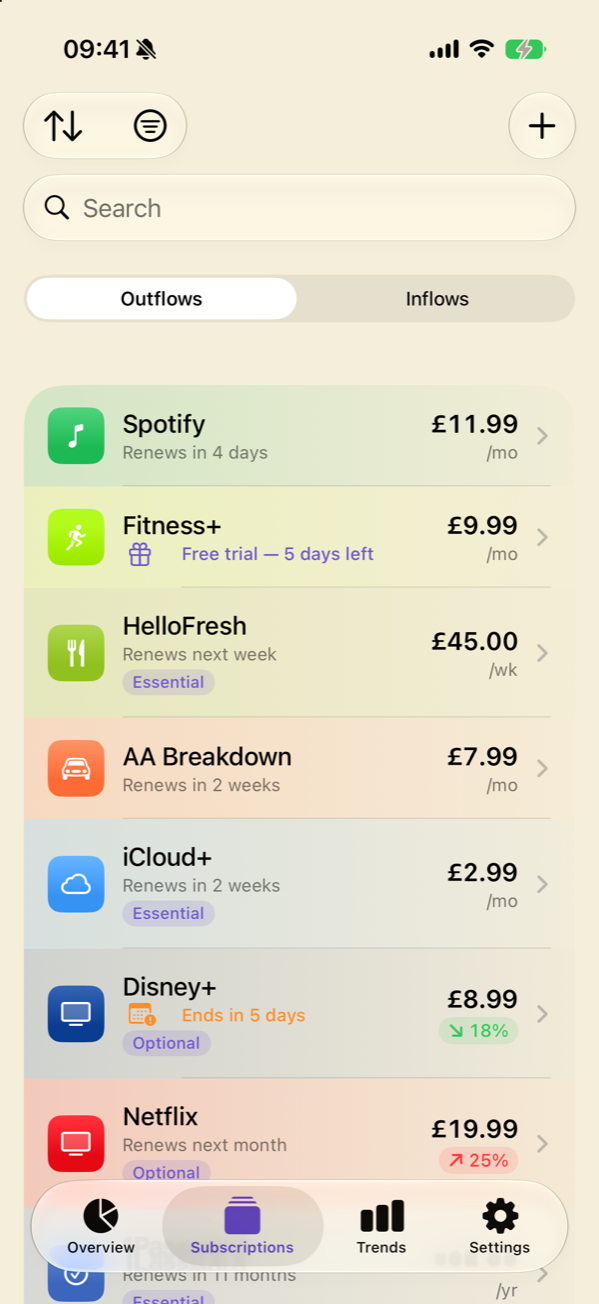
A reminder before every renewal, a heads-up a week before big yearly charges, and a nudge before a subscription you've set to end — so you cancel in time. Plus price-change flags (red ↑, green ↓) on every subscription.
📱
Widgets, everywhere
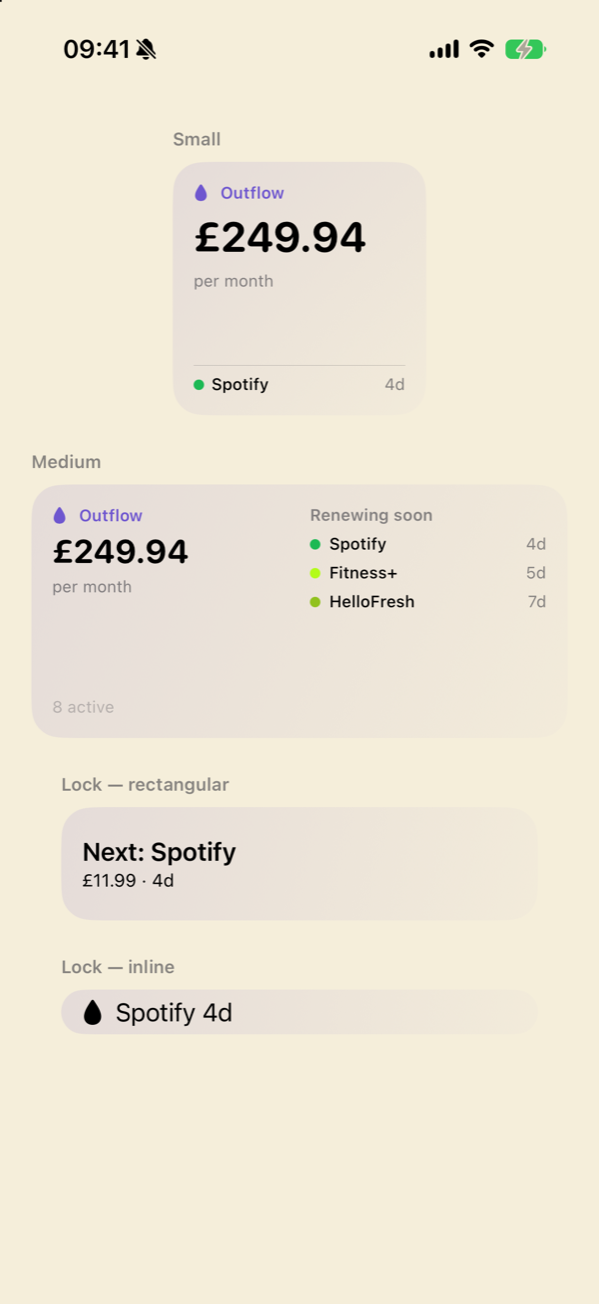
Home Screen widgets with your monthly spend and what's renewing next; Lock Screen widgets with the next renewal at a glance. Your outflow, always in view.
⏭️
Skip a payment
Free week from HelloFresh? Paused a delivery? Skip the next payment — the date moves on, no reminder fires, and your monthly and yearly totals drop until the skipped date passes.
💜
Pay once, own it
Free for up to 5 subscriptions — genuinely useful, not a limited demo. Pro is a single one-time purchase with no annual renewal and no upsell. A subscription tracker that charges no subscription.
🎙️
Siri & App Intents
"Hey Siri, what renews this week?" Outflow is fully wired to iOS App Intents — Siri and Shortcuts can query your subscriptions, surface reminders, and run automations right from the lock screen.
🎨
Designed for modern iOS
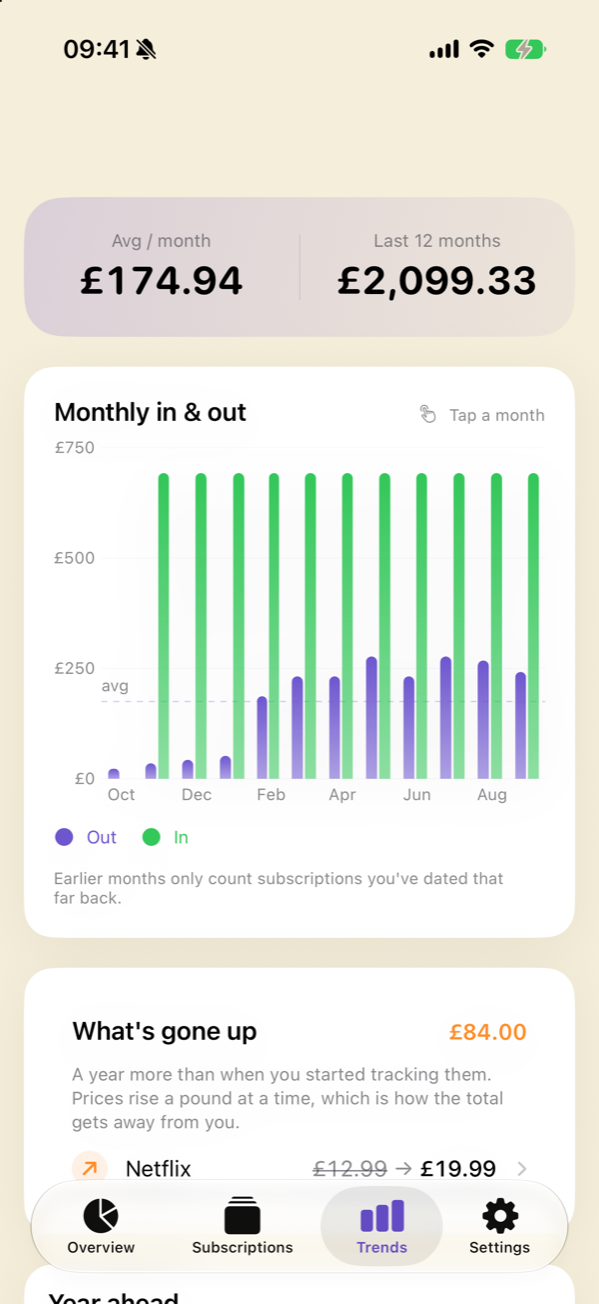
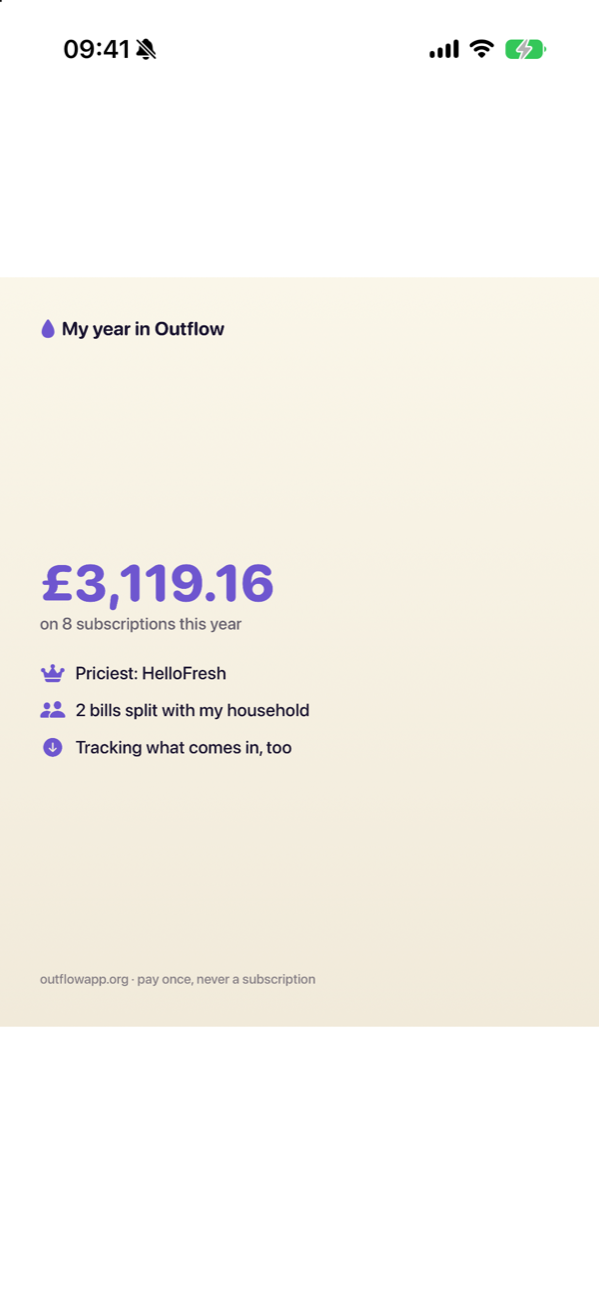
Liquid Glass design, Dynamic Type, SF Symbols, tags and custom colours, Dark Mode, payment calendar, a 12-month Trends chart and a shareable “Your Year in Outflow”. It looks and feels like Apple built it.
iPhone · iPad · Mac
Calm, on the big screen.
On iPad, Outflow uses the room: iPadOS 27's floating tab
bar, a sidebar when you want one, and money out and money in side by side.
On a Mac with Apple silicon it installs from the Mac App Store and runs the
same app in its own window. Optional iCloud Backup — to your own
iCloud, never our servers — keeps your data with you.
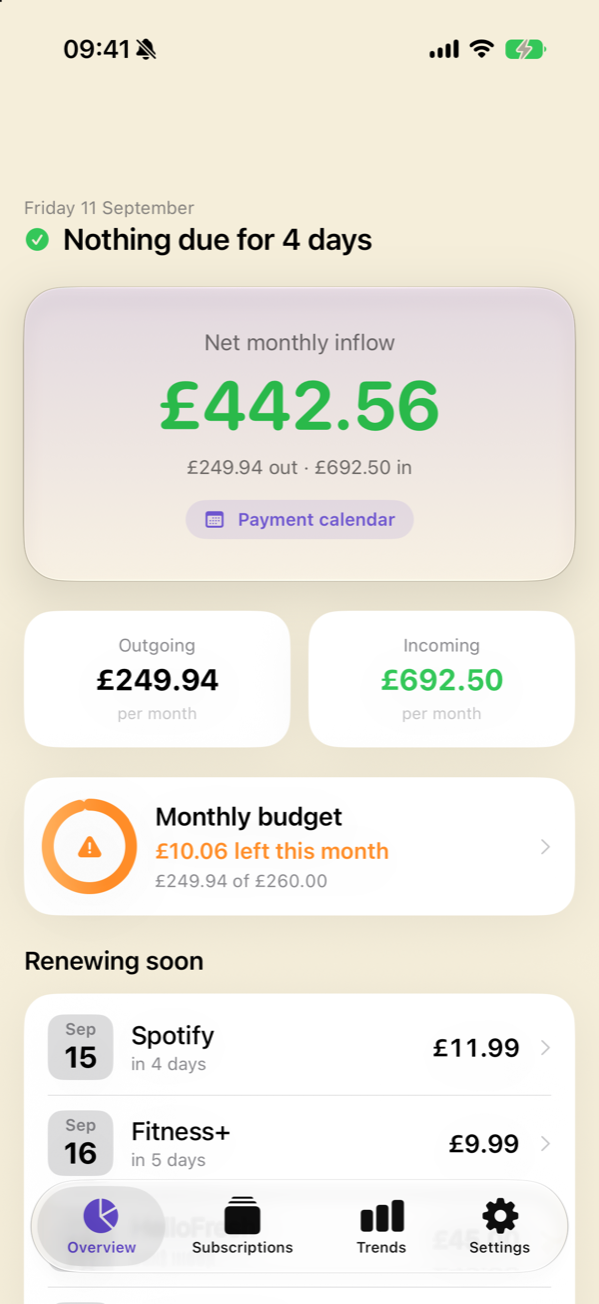
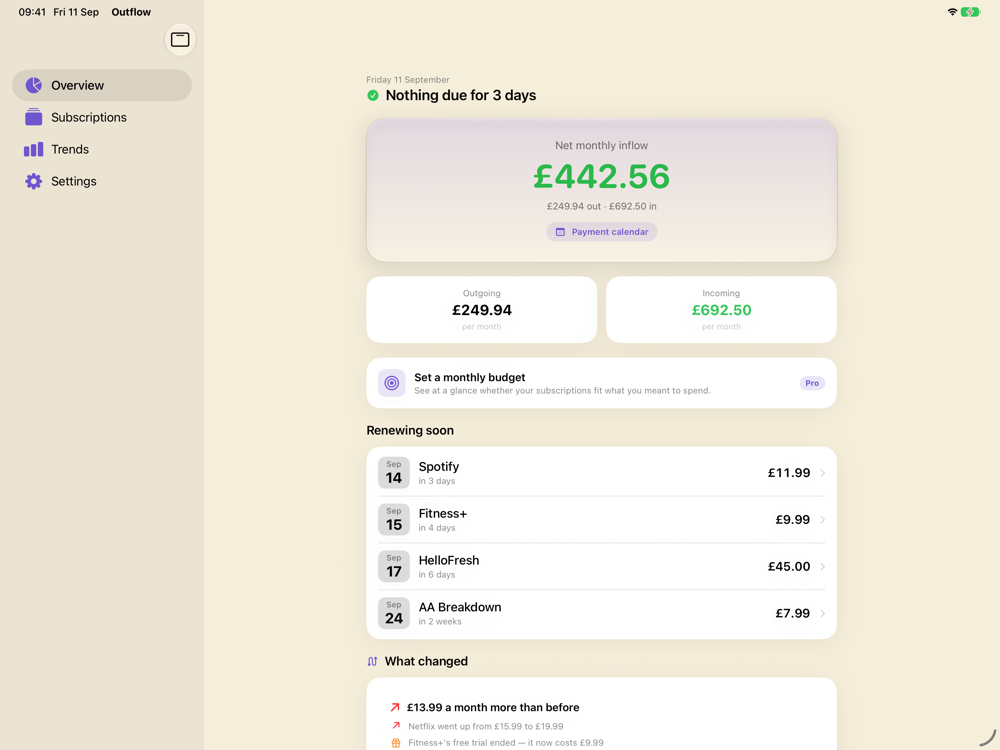
Overview — what's left each month, and both sides of it
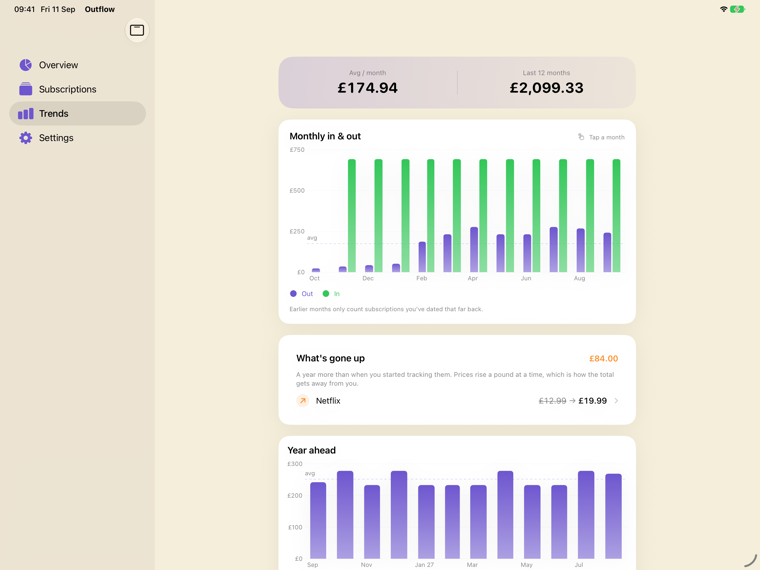
Trends — twelve months in and outEverything you pay, one switch from what comes in
How it compares
The tracker that does it right.
Rocket Money links your bank and charges monthly. Bobby keeps a clean list but stops there. Outflow is private, pays once, and helps you find and cancel what you'd forgotten.
Feature
Rocket Money
Bobby
Outflow 💧
Bank linking required
✕Plaid required
✓Not required
✓Never required
Track income too
✓From your bank feed
✕
✓Inflows, no bank login
Share & split with a partner
—
✕
✓Shareflows, counted once
On-device AI entry
✕
✕
✓Smart Paste
Data stored on-device only
✕Cloud
✓Local
✓100% on-device
Pricing model
Monthly subscription
One-time
Free + $4.99 once
Renewal reminders
✓
✓
✓+ price-change alerts
Siri / App Intents
✕
✕
✓iOS 27 native
iPad & Mac
✓Web app
✕iPhone only
✓Native big-screen layout
Recent updates
✓
Last: Dec 2025
✓Every few weeks
Pricing
Simple. Fair. Once.
The free tier is genuinely useful. Pro is a one-time unlock — no subscription, no renewal, no catch.
Once, and it's yours — never a subscription. Founder price while Outflow is new: it rises as the app grows, and yours never does. US price; the App Store shows your country's.
Best subscription tracker apps for iPhone (2026) Rocket Money, Bobby, Orbit, SubPilot, Emma, Snoop and Outflow compared on dated, checkable facts — including where another app is the better answer.
Yes, from version 5.1, as part of Outflow Pro. The Watch app shows this month's total, the next payment and everything coming up, in and out. It gets its figures straight from Outflow on your iPhone — there is no server and no account — so it needs the iPhone app, and watchOS 11 or later. Without Pro, the Watch app explains what Pro adds and shows nothing of yours.
Does Outflow work with iOS 27?
Yes. Outflow is built with Apple's iOS 27 SDK for iOS 27 and iPadOS 27 — Liquid Glass throughout, and iPadOS 27's floating tab bar on iPad — and it still runs on iPhone and iPad from iOS 18, so an older device is fine too. On a Mac with Apple silicon it installs from the Mac App Store.
Which banks work with Outflow's Find from transactions?
It uses Apple's FinanceKit, so it works wherever Apple does. In the UK that means open-banking accounts on iOS 18.4 or later; Apple lists Barclays, Barclaycard, First Direct, Halifax, HSBC, Lloyds, M&S Bank, MBNA, Monzo, Nationwide, NatWest, Royal Bank of Scotland and Santander. In the US it covers Apple Card, Apple Cash and Savings. Anywhere else, scanning a statement does the same job.
Can Outflow find subscriptions automatically, without a bank login?
Yes, on iPhone. Outflow uses Apple's FinanceKit to read transactions already stored on the device and find the ones that repeat. You are never asked for a bank username, password or one-time code, and there is no Plaid connection. Apple's own permission sheet lets you choose which accounts Outflow may look at and how far back, and you can withdraw it at any time in iOS Settings. The data is read on-device and Apple states it is never seen by Apple. It is a beta, off until you switch it on, and Apple offers it in some regions only — the UK needs iOS 18.4 or later. Scanning a statement does the same job everywhere else.
Can I share and split subscriptions with a partner?
Yes — that is Shareflows. You share chosen subscriptions with a partner or household over iCloud and set how each one is split: evenly, all yours, or all theirs. A shared bill then counts towards each person's total by their share only, instead of both of you recording the full amount in separate apps and inflating both totals. Anything you don't share stays private to you, and it needs no account or server — it moves through your own iCloud.
Can Outflow track my income as well as my subscriptions?
Yes — that is Inflows. Outflow records money arriving on a schedule (a salary, freelance retainers, benefits, a pension, rent received) alongside what you pay out, and keeps the two sides separate so income is never counted as a cost. No bank login is involved: recurring income is predictable by definition, so you enter it once and it stays right until something changes. It is built in — nothing to switch on.
Is there a subscription tracker that shows income and outgoings without a bank login?
Outflow does both. Most trackers show only what leaves your account, and the ones that show income usually get it by connecting to your bank. Outflow never requires a bank login — you enter recurring income once, the same way you add a subscription — and nothing leaves your device. Its App Store privacy label is Data Not Collected.
Does Outflow require linking my bank account?
No. Outflow never asks for a bank username, password or one-time code, and never connects through Plaid or any other data aggregator. You add subscriptions by scanning a statement, pasting a receipt, picking from the built-in catalogue or typing. On iPhone you can optionally let it read transactions Apple already keeps on the device, through Apple's FinanceKit and Apple's own permission sheet, for the accounts you choose — which involves no login either.
Is Outflow itself a subscription?
No. Outflow is free to download and free for up to 5 subscriptions. Pro is a single one-time purchase — $4.99 in the US, and the App Store shows your own country's price. There is no monthly fee, no annual renewal, and no upsell. It would be pretty odd to charge a recurring subscription for an app whose whole purpose is to help you spot them.
What is Smart Paste and how does it work?
Smart Paste uses Apple Foundation Models — the on-device AI built into modern iOS — to read a pasted receipt, email confirmation, or imported PDF, then automatically fill in the subscription name, price, billing cycle, and renewal date. All inference runs on your iPhone. Nothing is sent to any external cloud API or server. It works even in Airplane Mode.
Does any of my financial data ever leave my iPhone?
Never. Outflow has no backend server, no analytics SDK, and no account system. Every subscription, amount, and date is stored locally on your device in SwiftData. The App Store privacy label is "Data Not Collected" — the highest privacy designation Apple offers, and one very few finance apps can honestly claim.
Is Outflow a good Bobby app alternative?
Yes. Outflow is built for users who loved Bobby's private, manual approach but want a modern replacement. It keeps the same local-only philosophy and adds everything Bobby lacked: on-device AI for auto-fill, App Intents for Siri, renewal reminders, price-change tracking, custom colours, and a design built for current iOS. Outflow ships an update every few weeks.
How is Outflow different from Rocket Money?
Rocket Money (formerly Truebill) connects to your bank through Plaid, and its Premium tier is a monthly subscription. Outflow requires no bank login, stores nothing off your device, and costs either nothing (free tier) or a one-time $4.99 for Pro — never a subscription. If privacy, cost, or bank-linking is a concern, Outflow is the alternative.
Does Outflow work on iPad and Mac?
Yes. Outflow runs on iPhone and iPad (iOS/iPadOS 18 or later) with a proper big-screen sidebar layout — and it installs from the App Store on any Apple silicon Mac. Optional iCloud Backup, stored in your own iCloud, keeps your data with you across devices.
Can Outflow skip a payment, like a HelloFresh free week?
Yes. Open the subscription and tap “Skip next payment” — for a free week, a trial period, or a delivery you've paused. The renewal date steps over the skipped payment, no reminder fires for it, it disappears from the payment calendar, and your monthly and yearly totals drop until the skipped date passes. One tap to un-skip if you change your mind.
Does Outflow have widgets?
Yes — Home Screen widgets (small and medium) with your monthly spend and what's renewing next, plus Lock Screen widgets so your next renewal is visible at a glance. Widgets update automatically whenever your data changes.
Can Outflow track bills and recurring payments, not just subscriptions?
Yes. Outflow tracks any recurring cost — streaming services, gym memberships, insurance, software licences, rent, utilities, internet, and more. Weekly, monthly, quarterly, and yearly billing cycles are all supported. You see your total monthly and yearly outgoings across everything.
Start knowing what you pay for.
Free to download. No bank login. No account. Just clarity.